
Scheduling Mid Cycle Invoicing
Overview
Scheduled Mid-Cycle Invoicing allows automated invoicing of subscription change logs outside of the standard billing cycle.
This feature enables:
- Automated changelog invoicing
- Global scheduling configuration
- Contract-level scheduling control
It eliminates the need for manual mid-cycle invoice generation and ensures timely billing of subscription changes.
Configuration
Scheduled Mid-Cycle Invoicing is configured in two places:
- Admin Hub (Global Configuration)
- Billing Contract (Contract-Level Configuration)
1. Admin Hub Configuration
Navigation
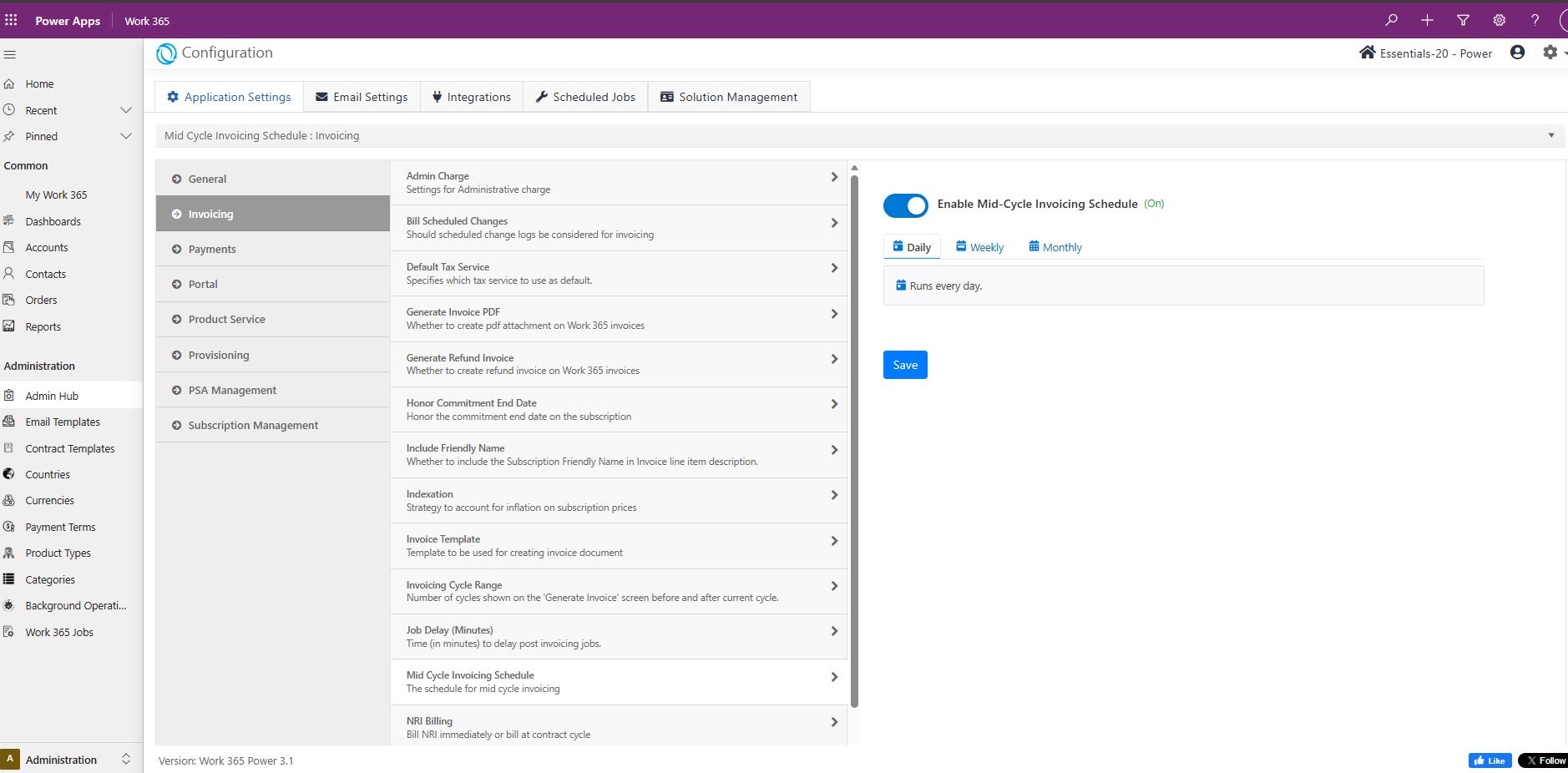
- Admin Hub → Configuration → Application Settings → Invoicing → Mid Cycle Invoicing Schedule
Enable Mid-Cycle Invoicing Schedule
Toggle Enable Mid-Cycle Invoicing Schedule to activate automated changelog invoicing.
When enabled, scheduling frequency options become available.
Frequency Options
Select how often the scheduler runs:
- Daily
- Weekly
- Monthly
Click Save after making changes.
This setting controls how frequently the system evaluates eligible contracts.
2. Billing Contract Configuration
At the Billing Contract level, administrators can determine whether a contract participates in scheduled changelog invoicing.
Enable Scheduled Change Log Invoicing
This control determines whether the contract will be picked up during automated runs.
- Enabled → Contract becomes eligible for scheduled changelog invoicing.
- Disabled → Contract is excluded from the scheduler.
Cron Control (Contract Frequency)
When contract-level scheduling is enabled, a Cron control becomes visible.
This allows administrators to define:
- Frequency
- Specific execution pattern
- Exact schedule timing
How It Works
The scheduled mid-cycle invoicing process follows this workflow:
Step 1 – Scheduler Trigger
The global scheduler runs based on the selected frequency (Daily / Weekly / Monthly).
Step 2 – Eligible Contract Identification
The system identifies contracts that:
- Have contract-level scheduling enabled
- Have a valid cron configuration
- Match the current execution window
- Contain unbilled change logs
Step 3 – Cron Evaluation
A backend cron picker:
- Evaluates contract cron expressions
- Determines eligibility
- Queues matching contracts
Step 4 – Invoice Processing
Eligible contracts are passed to the invoicing processor, which:
- Collects unbilled change logs
- Generates invoices
- Posts invoices according to invoicing rules
Eligibility Requirements
A contract will be automatically invoiced only if all of the following conditions are met:
- Global Mid-Cycle Scheduling is enabled
- Contract-level scheduling is enabled
- A valid Cron expression is configured
- Unbilled change logs exist
- The contract meets invoicing validation criteria
Benefits
- Reduces manual invoicing effort
- Improves revenue capture timing
- Automates change log billing
- Provides flexible contract-level scheduling
- Supports enterprise billing requirements
Important Notes
- Disabling global scheduling stops all automated mid-cycle invoicing.
- Contracts without a valid cron configuration will not be processed.
- This feature supplements — not replaces — the standard billing cycle.
Updated 8 months ago